Systeme io login : How can I connect to my account ?
Login to your Systeme io account and access your dashboard. Connecting to Systeme.io is easy. Secure login. Login to Systeme io
Would you like to login to your Systeme io account easily, in just a few clicks, to access your dashboard?
Here's how to log in to your Systeme io account :
1) go to the Systeme io login page : Systeme io - Login to my Account
2) Enter your username. This is the e-mail address associated with your account.
3) enter your password
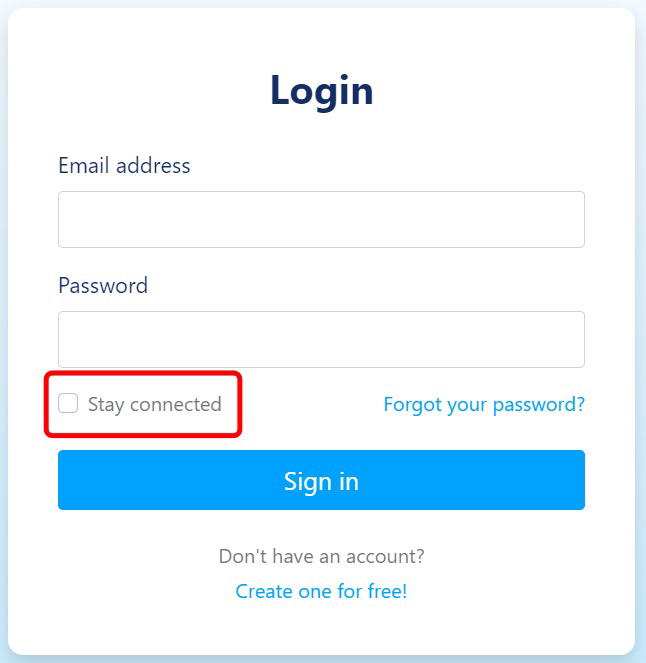
4) optional: to avoid having to re-enter your login details, you can check the "stay logged in" box
5) click on the blue "click here" button
How can I reset my Systeme io password ? (forgotten password)
Have you forgotten your Systeme io password, and can no longer access your account? Don't panic : you can reset your Systeme io password very easily, in just a few minutes.
Here's how to reset your password and access your Systeme io account :
1) go to the Systeme io login page : Systeme io - Login to my account
2) click on the blue "Forgot your password" ?
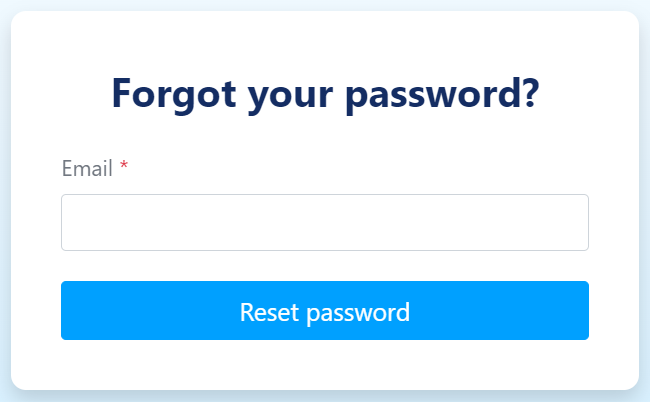
3) you are now on the Systeme io password reset page. Enter the email address associated with your Systeme io account and click on "reset password".
4) You should have received a password reset email from Systeme io, at the email address indicated above.
5) Open the e-mail, and click on "reset my password". You will then be redirected to a new page where you will be asked to enter a new password.
6) Enter your password a second time to confirm it, and click on the confirmation button to update your new Systeme io password.
Congratulations, you've just reset your password! You can now log in to your Systeme io account.
How can I change/modify my Systeme io password ?
Would you like to change the password associated with your Systeme io account? Changing your password is very easy and only takes 2 minutes.
If you have a short password, with less than 8 characters, we strongly recommend that you change your password to a new, more secure one.
Here's how to change your Systeme io password :
1) If you are not yet logged in to your Systeme io account, log in here : Systeme io - Login to my Account
2) Once logged in, click on your profile picture in the top right-hand corner, then click on "Settings".
3) A list of options appears in a column on the left. Scroll to the bottom, and select the "security" tab.
4) Enter your new password, then enter it again in the second box.
5) To confirm the password change, click on the blue "save" button in the top right-hand corner.
You have just changed the password of your Systeme io account !
How do I choose a good & secure password for my Systeme io account ?
Choosing a good Systeme io password can be complicated when you want the most secure password possible for your Systeme io account.
A good password will prevent your account from being hacked by a malicious person. The longer and more complicated the password, the more difficult it will be for an attacker to guess it.
Here are a few recommendations for the most secure password possible for your Systeme io account :
Choose a password of at least 12 characters. The longer your password, the harder it will be to guess. A 16-character password is ideal.
Use upper and lower case letters, numbers and special characters (such as "?" or "!").
Don't include personal information in your password, such as your last name, first name or date of birth.
Don't use simple words like "hello" or "home".
Don't use easy-to-guess characters like "12345678" or "azerty".
Is the connection to Systeme io secure ?
Do you have security concerns when logging into your Systeme io account? Don't worry, connecting to Systeme io is 100% secure.
In fact, Systeme io is protected by an SSL certificate, which encrypts all data transmitted between the site and the server. This SSL certificate can be seen by the padlock in your browser's search bar.
What's more, you can activate 2-factor authentication (2FA) to connect to your account, adding an extra level of security.
How can I secure my Systeme io account and activate 2-factor authentication (2FA) ?
There are a number of ways in which you can make your connection to your Systeme io account as secure as possible. First, make sure you have a strong, long and complex password, by following the recommendations given above.
The second way to secure your Systeme io account is to activate 2-factor authentication, also known as 2FA.
You're probably wondering: "What is 2FA, and how do I activate it ?" 2FA is an extra step that adds an extra layer of security when logging into your Systeme io account. Once you've entered your password, you'll be asked to enter a 6-digit verification code sent to the e-mail address associated with your account.
This means that even if someone with malicious intent knows your password, they won't be able to access your Systeme io account, as they will also need access to your mailbox to validate step 2FA.
Here are the steps to follow to activate 2-factor authentication (2FA) on your Systeme io account :
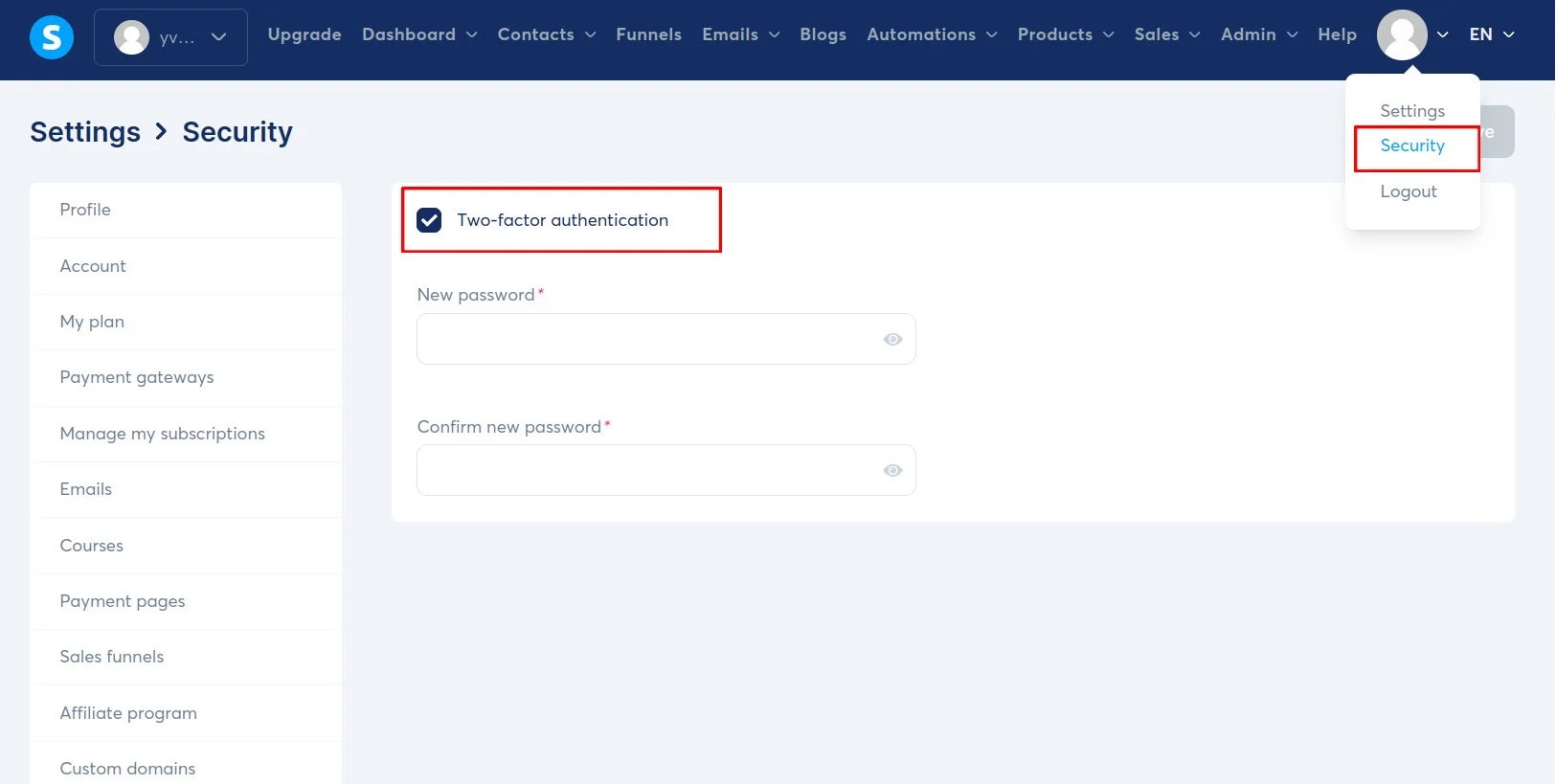
1) Click on your profile photo (top right)
2) Click on the "Security" tab (bottom left)
3) Check the "Two-factor authentication" box
Note : by default, 2-factor authentication is already enabled for your account. If you wish to disable this option, simply uncheck the box.
How to stay connected to my Systeme io account ?
Don't want to enter your password every time you log on to your Systeme io account? No problem, with the "stay connected" option, you can save your login information on your device, so you don't have to enter your password again and again.
Please note : before activating this option, make sure you're logged in on a trusted device that belongs to you.
How can I login to my Systeme io dashboard ?
The Systeme io Dashboard gives you 1-click access to all your sales and contacts. To access your Systeme io dashboard, click on this link : Systeme io - Login to Dashboard
There are also 2 other types of dashboard : the student dashboard and the affiliate dashboard.
The student dashboard gives you access to all your Systeme io training courses, whether purchased or obtained free of charge. To discover new courses, go to the "Explore" section.
The affiliate dashboard gives you access to your Systeme io affiliate link, enabling you to benefit from 60% of all subscriptions purchased by your affiliates. This dashboard also lets you view all the contacts generated by your affiliate link, as well as all the commissions you've earned.